
Explore the workspace
The native IDE is designed around familiar desktop panels instead of requiring you to learn many shortcuts immediately.
| Area | What it does |
|---|---|
| Solution Explorer | Find files and projects. On Linux, selected-file actions include create, rename and delete with safety checks. |
| Editor tabs | Show the files you have opened. |
| Properties | Inspect the selected interface element in UI Design mode. |
| Output | Read build and tool messages, including errors and exit codes. |
| Terminal | Run commands in a real operating-system shell. |
| Problems | Jump to recognised file and line errors from Hydrogen output. |
Resizing works with draggable pane separators. Full floating/docking layouts are still being completed.
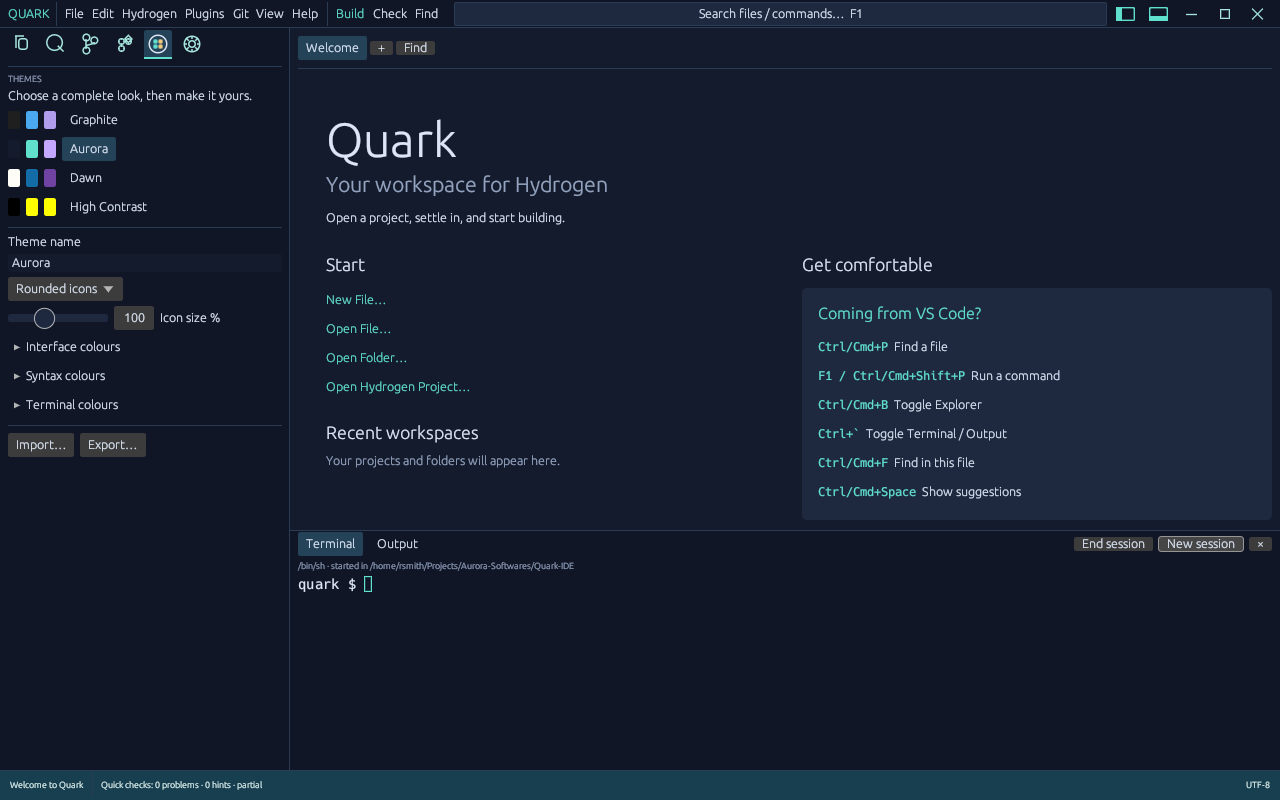
Development screenshot; some visual elements may differ in the newer native frontend.
Find something quickly
Section titled “Find something quickly”Use the File, Edit, View and Build menus first. Quark also has an editor and project search interface. Editor assistance includes lexical highlighting and local suggestions, but not a full Hydrogen language server.
Quark saves document recovery snapshots. This helps with unexpected exits but is not a substitute for backups or Git.